Setup & Basics
Mycel exposes a REST API that you'll want to reach to communicate with it.
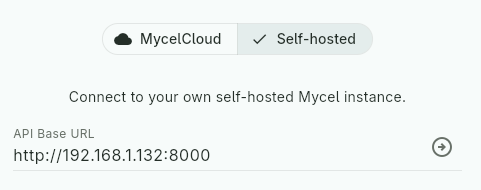
API Base URL
Required
Since Mycel can be self-hosted or reached through MycelCloud, your
client needs a way for the user to set and modify this base URL — this
is the URL your client will send requests to. For example:
http://192.168.1.10:8000 (self-hosted) or https://api.mycelcloud.com
(MycelCloud).
Provide a dedicated field to allow this, and ensure it persists across restarts.
URL sanitization
Users can easily make mistakes when entering a URL. It's a good
idea to sanitize and standardize it: add http:// or https://
if missing, trim whitespace, remove a trailing /, and so on.
MycelCloud Token
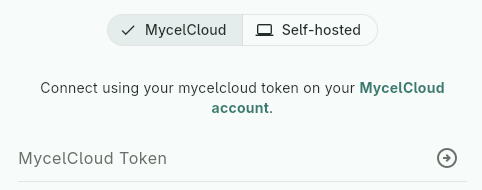
To enable communication with MycelCloud, provide a field for users to enter their authentication token. Include this token in the Authorization header of every request as Bearer $token. MycelCloud will automatically authenticate the user based on this token.
No need to conditionally send the token
MycelCloud requires the token to function, but if the user is self-hosting Mycel, sending a token anyway won't cause an error. So there's no need to distinguish the two cases — you can always send whatever token the user has entered, even if empty.
UI suggestion
You could offer a toggle between two sections: one requesting the
API base URL (self-hosted), the other requesting the token
(MycelCloud) — though any UI pattern works, as long as users can
easily provide the right one. In MycelCloud mode, the base URL can
simply be hardcoded to https://api.mycelcloud.com — no need to
expose it to the user.
Version compatibility
All requests may include the X-Mycel-Version header to indicate the
minimum Mycel version your implementation requires (e.g. 2.3.0). If
provided, Mycel will verify compatibility and return a version
error if incompatible — see Versioning
for the full compatibility rules.
Custom compatibility rules
This header is not required — you can choose not to send it.
However, omitting any kind of version check comes with risks: your
client may silently break against incompatible Mycel versions. If you
want to apply custom compatibility rules beyond what Mycel checks, use
the GET /version endpoint and implement your own logic in your client.
Request & Response Format
Mycel follows the standard REST conventions described in the
API reference.
All API calls are relative to this base URL — e.g. POST {base_url}/collections/{col_id}/reviews/undo.
Domain endpoints always return the same response format, wrapping the
result in a data field: {"data": <response>}, while system
endpoints follow a different format, detailed in the
API reference.
Initiate communication
Required
To check if Mycel is reachable, you can use the GET /health endpoint. It should return 200 when everything is working as expected, but if not, let’s see what errors you may encounter in the next section!
Display Mycel version
After validating the connection, you can fetch the Mycel instance version using GET /version and display it in the connection configuration page.